movlyric
Turn music and lyrics into a lyric video, automatically.
Just load your audio and lyrics. AI analysis lines up the BPM, the chorus sections and the lyric timing for you.
From analysis to export, everything runs on your machine.
// features
Load it and it’s automatic.
Tweak it and it goes as far as you like.
Automatic music analysis
AI detects BPM, beats, chorus sections and energy, right down to the frequency spectrum. Choruses build up on their own, and you can drive animation from the beat or the sound however you like.
Automatic lyric alignment
Just paste your lyrics and speech-recognition AI aligns the timing on three levels: phrase, word and character. Sustained notes (long tones) are detected too. Japanese, English, Chinese, Korean and mixed lyrics all work.
143 style presets
Search 143 styles across 12 categories, from pop and rock to Japanese-traditional and kinetic, and switch with one click. Save the look you tuned as My Style and share it as a .mvstyle file.
Music-reactive equalizer
14 background effects, including bottom bars, radial, ring and tunnel, move in real time with the frequencies of the track. Use them as a style default or apply one across the whole song.
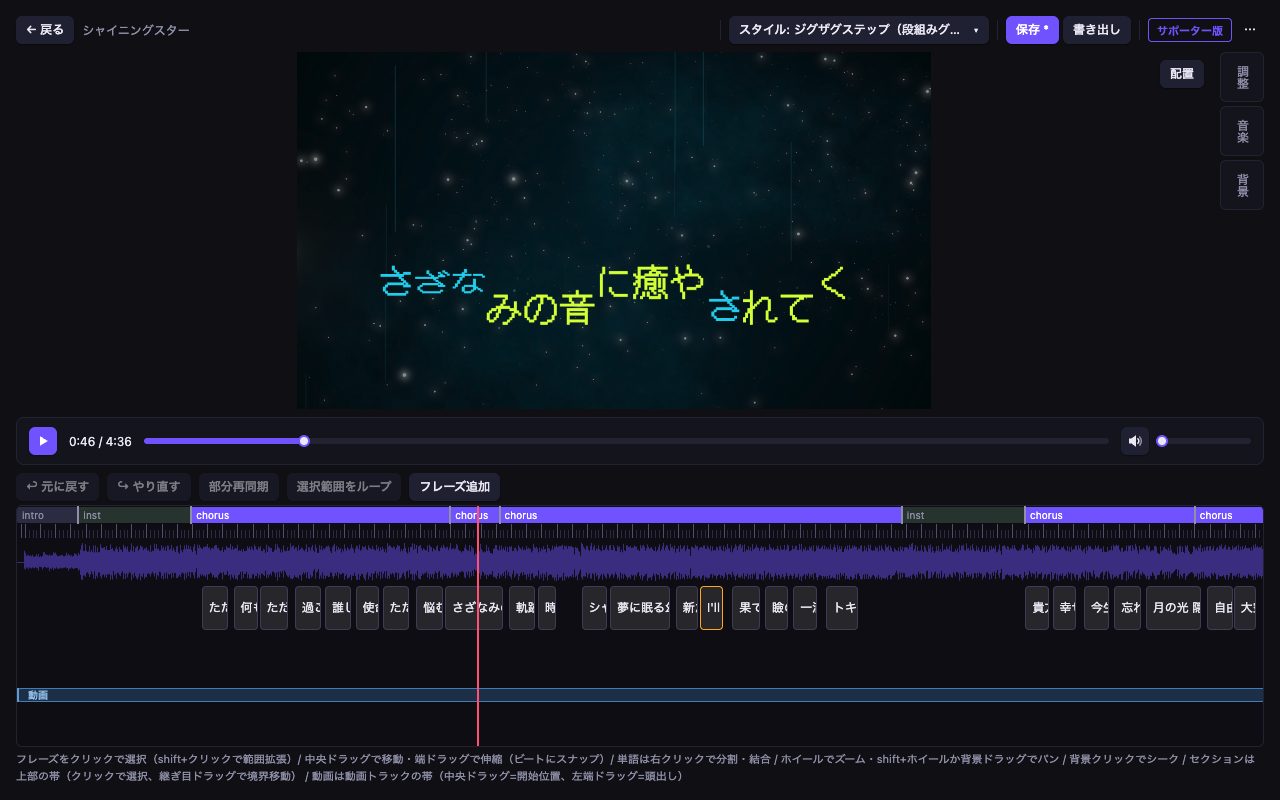
Timeline editing
Drag editing, beat snapping, undo/redo and partial re-sync, plus word splitting and merging, ruby (phonetic guides), foreground images, enter/exit offsets and A-B loop playback.
Export in many formats
mp4, WebM, mov (ProRes) and animated WebP are supported. Transparent (alpha) export lets you hand the result straight to your video editing software as a source clip.
🔒 Your audio, lyrics and video are never sent to an external server. From analysis to export, everything stays inside your own machine.
// how it works
A lyric video in 3 steps
Leave the timing to the app. All you have to do is pick the look.
Load
Drag and drop your audio (or video) and your lyrics. AI analyzes the BPM, the chorus sections and the lyric timing automatically.
Choose and adjust
Pick a favorite from 143 styles. The Recommended tab suggests styles that suit the track, and the timeline lets you fine-tune timing and placement.
Export
Export to a video file that looks exactly like the preview. With transparent export you can layer it over background footage in your video editing software.
// screenshots
Take a look at the app
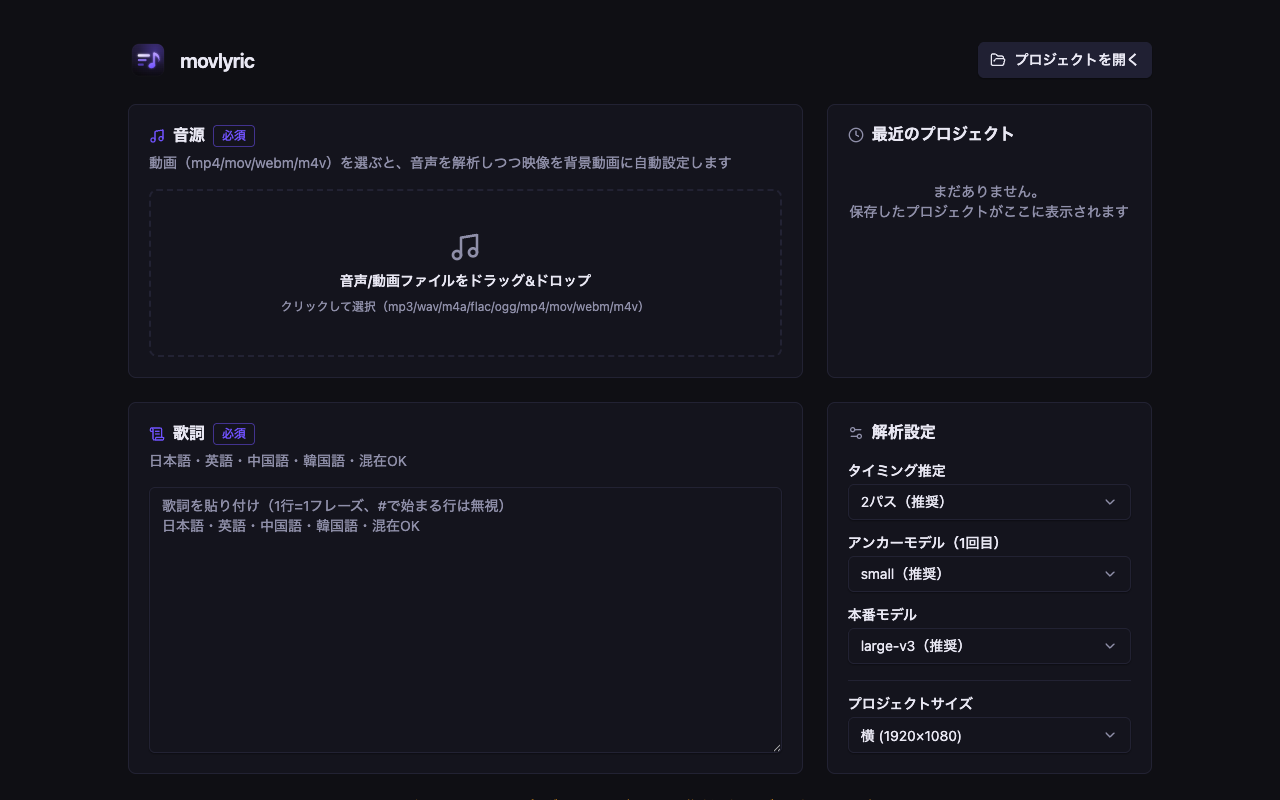
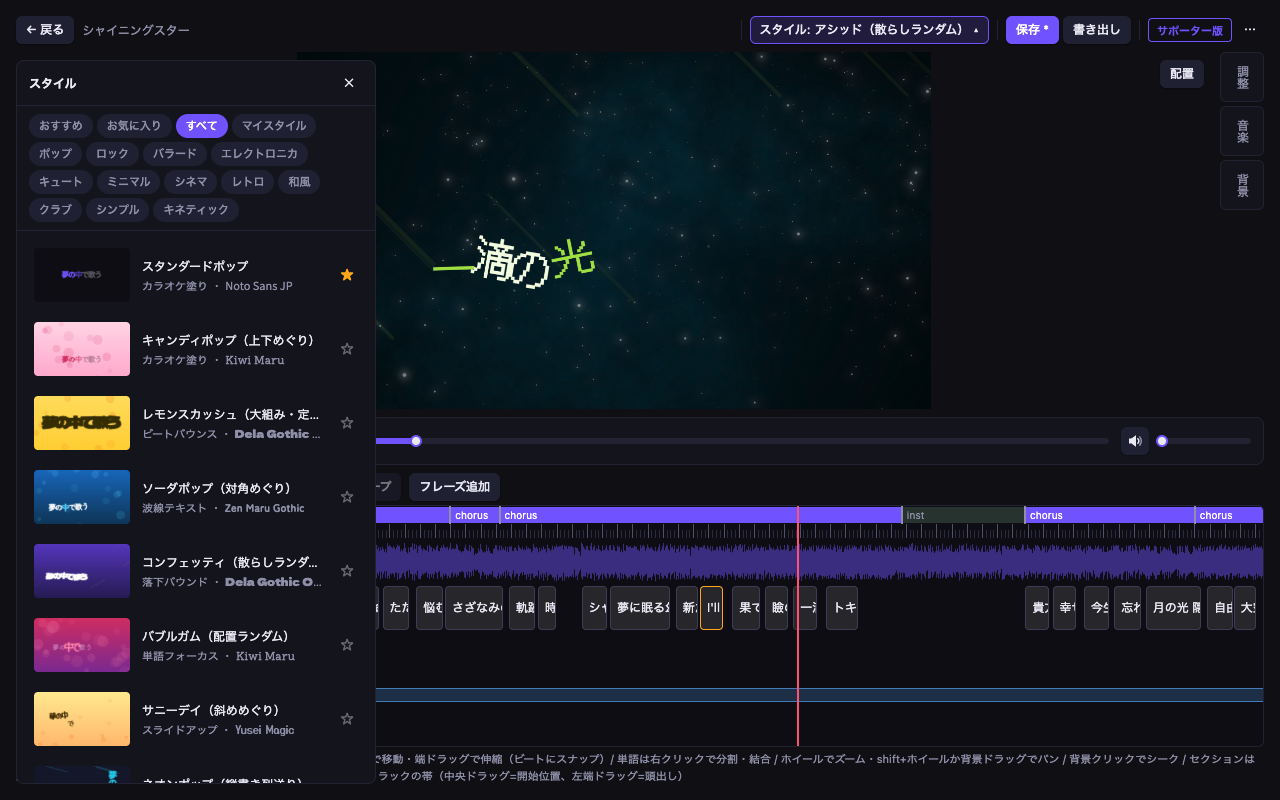
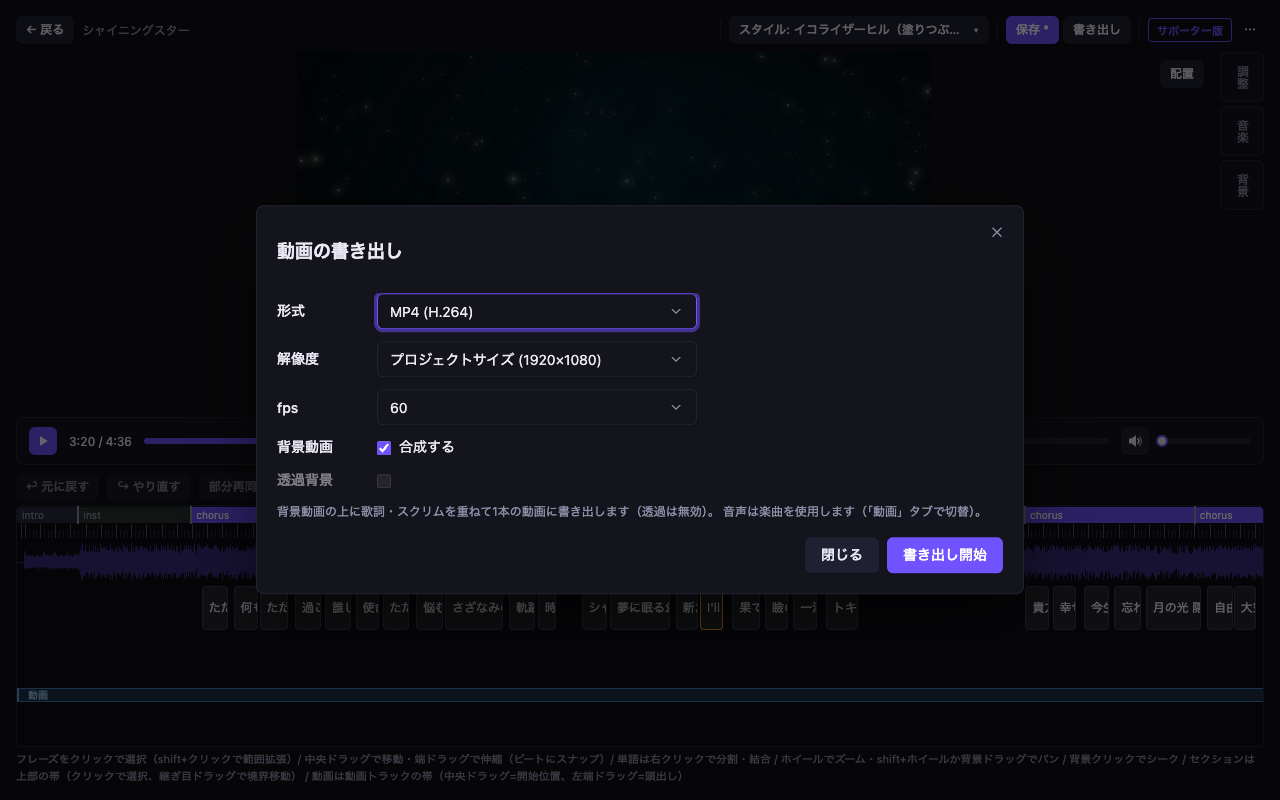
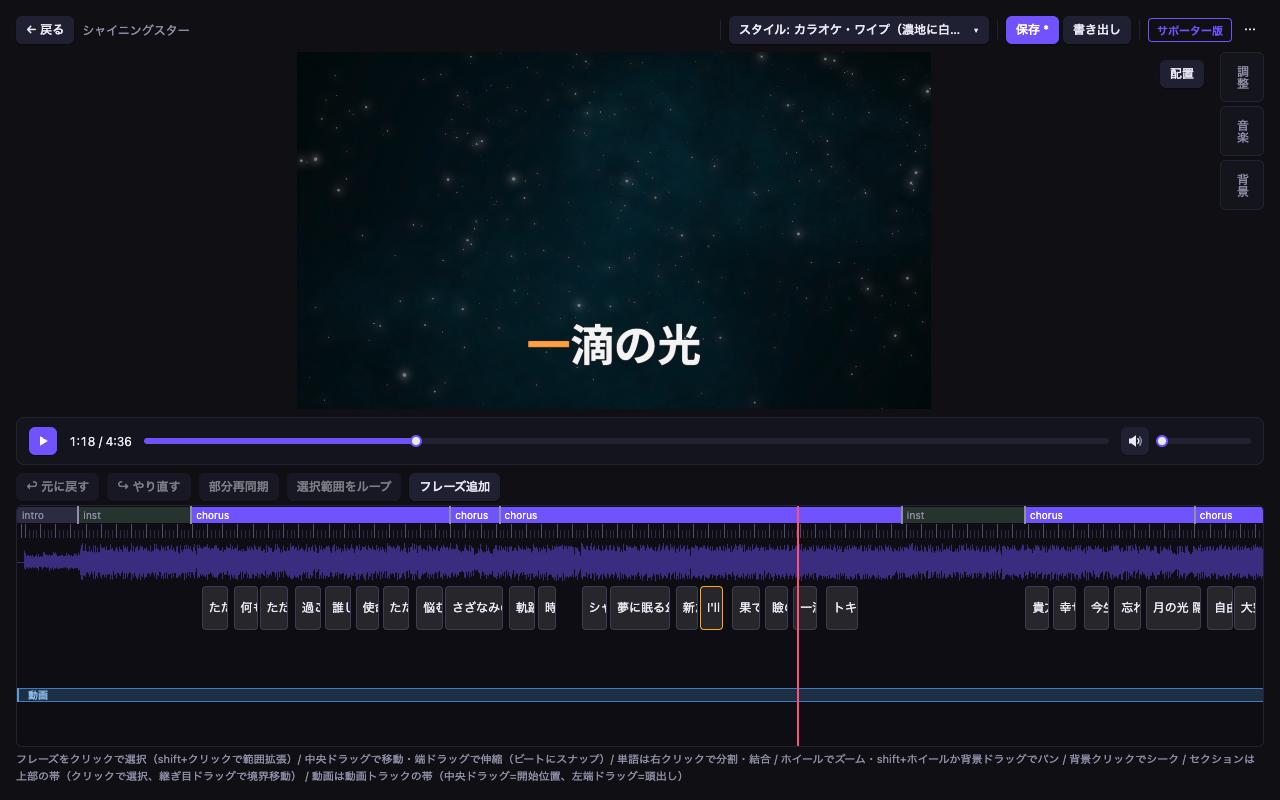
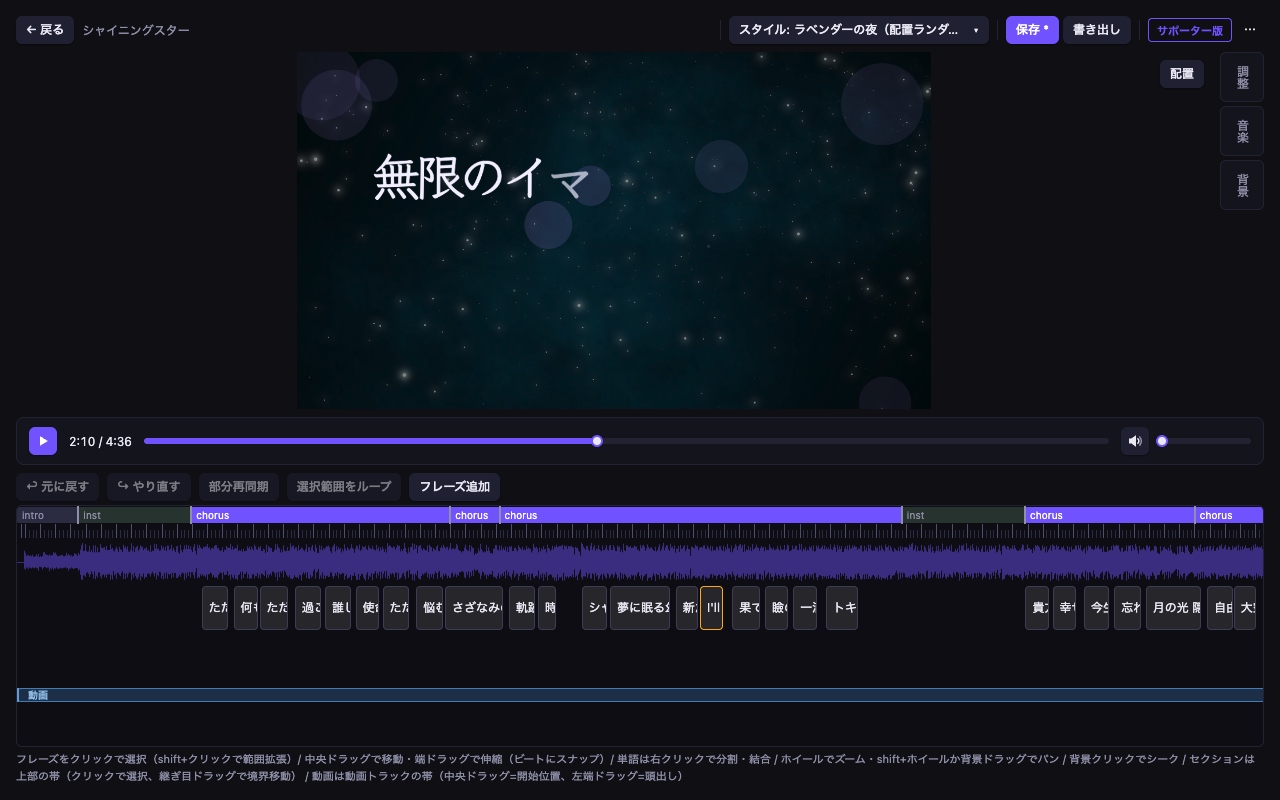
♪ The song and lyrics used in the screenshots are 「シャイニングスター」 (Shining Star).
Music: 魔王魂 (Maou Damashii)
// custom
If the effect you want isn’t there, build it.
Text motion, background effects and lyric placement can all be written yourself in JSON. Hand the whole specification to an AI from “Create with AI…” in the style editor, describe the effect you want, and you get the JSON back.
AnimationSpec
Text motion→
Define how lyrics enter, exit and move while on screen using keyframes. Color, outline, glow and per-axis scaling can all be specified.
GraphicSpec
Background effects→
Define the shapes and lines that move behind the lyrics. Build music-reactive motion graphics with formulas, chains, polygons and conditionals.
LayoutSpec
Lyric placement→
Define where lyrics sit on screen. Build a layout from scratch, whether it is vertical writing, scattered placement or placement along a path.
The full specifications are published in the reference (with a Markdown version you can hand to an AI)
// plans
Free or Supporter
Editing, styles, export formats and resolutions are all fully featured for free.
The only differences are 60fps and transparent export.
¥0/ forever
Available once you join the Discord server. Everything you need to make your work is included.
- ✓Editing, preview and styles: fully featured
- ✓Export formats: mp4 / WebM / mov (ProRes) / animated WebP
- ✓Max resolution: 4K (3840x2160)
- ✓Frame rate: 24 / 30 fps
- –Transparent (alpha) export
⚡Unlocked by joining pixivFANBOX
Join the supporter plan on pixivFANBOX and the supporter role is granted automatically on Discord, unlocking 60fps and transparent export.
- ✓Everything in the free version
- ✓Frame rate: 24 / 30 / 60 fps
- ✓Transparent (alpha) export
- ♥Developer motivation +100
* Using movlyric (including the free version) requires signing in with a Discord account and joining the designated server. Authentication goes through Discord OAuth2.
// setup
Setup guide
Four steps and you are ready to create. The longest part might be deciding which song to use.
Join the Discord server
Using movlyric requires joining the KonaLab Discord server. News and support are provided there as well.
Join the KonaLab DiscordDownload the installerComing soon
Download the installer for your OS from GitHub Releases (macOS: .dmg, Apple Silicon only / Windows: .exe, x64). Distribution is still being prepared, so please hold on a little longer until release.
GitHub Releases →Launch the app
Run the installer and launch the app. Because the build is unsigned, your OS may warn you the first time you open it. Always use the download from the official links on this page. On Windows you can launch it from SmartScreen via “More info” → “Run anyway”. If macOS says the app cannot be opened because the developer cannot be verified, use one of the methods below.
Method 1: Open from the right-click menu
In Finder, right-click movlyric.app (or Control-click it) → choose “Open” → click “Open” in the confirmation dialog. This is only needed the first time; after that a normal double-click works.
Method 2: Remove the quarantine attribute with the xattr command
$ xattr -cr /Applications/movlyric.app
xattr -cr recursively removes the quarantine attribute (com.apple.quarantine) that macOS adds to downloaded files (-c clears all extended attributes and -r processes directories recursively). This lifts the block from Gatekeeper.
Sign in with Discord
Once it launches, click “Sign in with Discord”. As soon as your server membership is confirmed you are ready to go (the free version needs sign-in and server membership too). After that, just load your audio and lyrics.
* On macOS a keychain access prompt appears at launch so that your sign-in details can be stored securely. Choose “Always Allow” (see the FAQ for details).
// system requirements
🍎 macOS
- › Mac with Apple Silicon (Intel Macs are not supported)
- › Distributed as a .dmg
💻 Windows
- › Windows 10 / 11 (x64)
- › Distributed as an installer (.exe)
⚠️ Limitations
- • The music analysis model ships with the app. Only the lyric alignment model is downloaded automatically on the first analysis (up to about 2.9GB depending on the model you choose)
- • The installer is unsigned, so your OS asks for a confirmation the first time you launch it
- • There is no auto-update. New releases are announced only, and you download and apply them manually
// faq
Frequently asked questions
Q.The first analysis takes a long time
A.The music analysis model ships inside the app, but the lyric alignment model alone is downloaded on the first analysis (up to about 2.9GB depending on the model you choose). It is cached from then on, and re-analyzing the same song is fast.
Q.The lyrics or the playback position drift across the whole song (even after re-analyzing)
A.The metadata of the audio file itself (the recorded track length) may be broken. Analysis reads the actual audio data, so it produces correct times, but playback uses the broken metadata as its reference, which makes everything look out of sync. When this happens, a warning appears at the top of the app: the metadata duration of the audio file does not match the actual data. Try a different audio file, or re-encode the file and use that instead.
Q.Analysis finished but not a single lyric line is shown
A.The audio you loaded may be silent (an empty audio track). With no sound, every lyric timing estimate fails and all phrases collapse to zero length at the end of the song. When this happens, a warning appears at the top of the app telling you the audio contains no sound. Use an mp3, m4a, wav or similar file that actually contains audio.
Q.The app will not open after installing
A.The installer is unsigned, so the protection features of your OS may stop it. On macOS, right-click the app in Finder → “Open”, or run xattr -cr /Applications/movlyric.app in Terminal to remove the quarantine attribute. On Windows you can launch it from SmartScreen via “More info” → “Run anyway”. Always use the download from the official links on this site.
Q.It asks for a keychain password at launch (macOS)
A.That is a legitimate macOS prompt: movlyric encrypts your Discord sign-in details in the macOS keychain and needs permission to store and read them. Choose “Always Allow” and it will stop appearing for that version. You type into a macOS system dialog, and movlyric never receives the password itself.
- ›“Allow” grants permission for this time only, so it appears again the next time you launch. If you see it every time, choose “Always Allow” instead
- ›Choosing “Deny” does no harm. Sign in to Discord again and everything works as usual (choose “Always Allow” in the dialog that appears then)
- ›Seeing it again after an update is by design. Because the build is unsigned, your OS treats each version as a separate app and asks once per update
- ›If this dialog appears when movlyric is not running, choose “Deny”. Check that the app name in the dialog is movlyric (the item is named movlyric Safe Storage)
- ›Windows encrypts this differently, so the prompt never appears there
Q.Section boundaries (choruses and so on) are slightly off from where the singing starts
A.The known issue where boundaries snapped to short shouts or breaths has been fixed. Projects analyzed earlier may improve if you re-analyze them with the latest release. You can always adjust a boundary by hand by dragging the section edge on the timeline.
// Disclaimer & before you use it
This software (movlyric) is provided AS IS. The developer accepts no liability whatsoever for any damage arising from the use of this software, including but not limited to direct, indirect, incidental, special or consequential damage.
Clearing the rights to the music and lyrics is your responsibility. If you publish or distribute a lyric video you have made, follow the permission of the rights holders of the music and the lyrics, or the terms of service and rights-clearing mechanisms of the platform you post to. The developer accepts no liability for any infringement arising from the use of movlyric.
This software is an individual project, and development may be stopped or suspended without notice. Continued updates and support are not guaranteed.
All audio, lyric and video data that movlyric processes stays on your local machine and is never sent to an external server. An internet connection is used only in the following cases: the first download of an analysis model, authentication and server membership checks through Discord (re-checked automatically at launch once more than 24 hours have passed since the previous check), and checking for updates.
Your authentication details are stored encrypted on your own device. If more than 30 days pass since the last check (including time spent offline), you will need to sign in again.
The bundled fonts are redistributed under the OFL, the IPA Font License and the M+ FONTS LICENSE, and the distribution package includes the full text of each license together with its copyright notice. FFmpeg is bundled as an LGPL-licensed build, and the corresponding source code is published on GitHub. Licenses for the other bundled components can be read from “License Notices” inside the app.
The official terms of use and the full disclaimer can be read from “Terms of Use and Disclaimer” in the footer inside the app.